With your permission, we use Google Analytics cookies to measure visits and improve the site. Necessary cookies are always on. You can change your choice or withdraw consent anytime in the footer, under Cookie settings. Cookie Policy
Memory enables Claude to retain context across sessions and conversations. It exists in two forms: automatic synthesis in claude.ai, and filesystem-based CLAUDE.md in Claude Code.
Overview
Memory in Claude Code provides persistent context that carries across multiple sessions and conversations. Unlike temporary context windows, memory files allow you to:
Share project standards across your team
Store personal development preferences
Maintain directory-specific rules and configurations
Import external documentation
Version control memory as part of your project
The memory system operates at multiple levels, from global personal preferences down to specific subdirectories, allowing for fine-grained control over what Claude remembers and how it applies that knowledge.
The /init command is the fastest way to set up project memory in Claude Code. It initializes a CLAUDE.md file with foundational project documentation.
Usage:
Terminal
/init
What it does:
Creates a new CLAUDE.md file in your project (typically at ./CLAUDE.md or ./.claude/CLAUDE.md)
Establishes project conventions and guidelines
Sets up the foundation for context persistence across sessions
Provides a template structure for documenting your project standards
Enhanced interactive mode: Set CLAUDE_CODE_NEW_INIT=1 to enable a multi-phase interactive flow that walks you through project setup step by step:
Terminal
CLAUDE_CODE_NEW_INIT=1 claude
/init
When to use /init:
Starting a new project with Claude Code
Establishing team coding standards and conventions
Creating documentation about your codebase structure
Setting up memory hierarchy for collaborative development
Example workflow:
Terminal
# In your project directory
/init

# Claude creates CLAUDE.md with structure like:
# Project Configuration
## Project Overview
- Name: Your Project
- Tech Stack: [Your technologies]
- Team Size: [Number of developers]

## Development Standards
- Code style preferences
- Testing requirements
- Git workflow conventions
Quick Memory Updates
Note: The # shortcut for inline memory was discontinued. Use /memory to edit memory files directly, or ask Claude conversationally to remember something (e.g., "remember that we always use TypeScript strict mode").
The recommended ways to add information to memory are:
Option 1: Use /memory command
Terminal
/memory
Opens your memory files in your system editor for direct editing.
Option 2: Ask conversationally
Terminal
Remember that we always use TypeScript strict mode in this project.
Please add to memory: prefer async/await over promise chains.
Asking Claude to remember something saves it to auto memory. To change CLAUDE.md instead, say "add this to CLAUDE.md", or edit the file yourself with /memory.
Historical reference (no longer functional):
The # prefix shortcut previously allowed adding rules inline:
Terminal
# Always use TypeScript strict mode in this project ← no longer works
If you relied on this pattern, switch to the /memory command or conversational requests.
The /memory Command
The /memory command provides direct access to edit your CLAUDE.md memory files within Claude Code sessions. It opens your memory files in your system editor for comprehensive editing. When the file opens in a GUI editor, the session no longer blocks while the file stays open, so you can keep working in parallel (v2.1.216); terminal editors like Vim still take over the terminal until you exit.
Usage:
Terminal
/memory
What it does:
Opens your memory files in your system's default editor
Allows you to make extensive additions, modifications, and reorganizations
Provides direct access to all memory files in the hierarchy
Enables you to manage persistent context across sessions
When to use /memory:
Reviewing existing memory content
Making extensive updates to project standards
Reorganizing memory structure
Adding detailed documentation or guidelines
Maintaining and updating memory as your project evolves
Comparison: /memory vs /init
Aspect
/memory
/init
Purpose
Edit existing memory files
Initialize new CLAUDE.md
When to use
Update/modify project context
Begin new projects
Action
Opens editor for changes
Generates starter template
Workflow
Ongoing maintenance
One-time setup
Example workflow:
Terminal
# Open memory for editing
/memory

# Claude presents options:
# 1. Managed Policy Memory
# 2. Project Memory (./CLAUDE.md)
# 3. User Memory (~/.claude/CLAUDE.md)
# 4. Local Project Memory

# Choose option 2 (Project Memory)
# Your default editor opens with ./CLAUDE.md content

# Make changes, save, and close editor
# Claude automatically reloads the updated memory
Using Memory Imports:
CLAUDE.md files support the @path/to/file syntax to include external content:
Terminal
# Project Documentation
See @README.md for project overview
See @package.json for available npm commands
See @docs/architecture.md for system design

# Import from home directory using absolute path
@~/.claude/my-project-instructions.md
Import features:
Both relative and absolute paths are supported (e.g., @docs/api.md or @~/.claude/my-project-instructions.md)
Recursive imports are supported with a maximum depth of 4 hops
First-time imports from external locations trigger an approval dialog for security
Import directives are not evaluated inside markdown code spans or code blocks (so documenting them in examples is safe)
Helps avoid duplication by referencing existing documentation
Automatically includes referenced content in Claude's context
Memory Architecture
Memory in Claude Code follows a hierarchical system where different scopes serve different purposes. Unlike Claude Web/Desktop's 24-hour synthesis cycle (see Memory in Claude Web/Desktop below), Claude Code has two memory systems that both load at the start of every session and update continuously, not on a timer:
Terminal
graph TB
    A["Session Start"]
    B["CLAUDE.md Files<br/>(you write)"]
    C["Auto Memory<br/>(Claude writes)"]
    D["Claude Session"]
    E["Your Correction /<br/>Preference"]

    B -->|loaded in full| A
    C -->|MEMORY.md loaded| A
    A --> D
    D -->|"Remember that..."| E
    E -->|writes during session| C
    D -->|"add this to CLAUDE.md"| B
Memory Hierarchy in Claude Code
Claude Code has two complementary memory systems, both loaded at the start of every conversation: CLAUDE.md files (instructions you write) and auto memory (notes Claude writes itself). CLAUDE.md files are concatenated into context rather than overriding each other - this is not a strict precedence chain where a higher tier replaces a lower one. .claude/rules/*.md files are a separate, related mechanism for topic- or path-scoped instructions.
CLAUDE.md file locations, in load order (broadest scope to most specific):
Organization-wide instructions managed by IT/DevOps. Cannot be excluded by individual settings.
User instructions
~/.claude/CLAUDE.md
Personal preferences for all projects
Project instructions
./CLAUDE.md or ./.claude/CLAUDE.md
Team-shared instructions, version controlled. Since v2.1.277, ./AGENTS.md loads at this same tier instead, when no CLAUDE.md or CLAUDE.local.md exists at or above the working directory - controlled by Project instructions in /config
Local instructions
./CLAUDE.local.md
Personal project-specific preferences; add to .gitignore
Within the directory tree, Claude Code walks up from your working directory: foo/CLAUDE.md loads before foo/bar/CLAUDE.md if you launch from foo/bar/, so instructions closer to where you launched are read last - not "highest priority" in an override sense, just most recent in context. Within each directory, CLAUDE.local.md is appended after CLAUDE.md. CLAUDE.md and CLAUDE.local.md files in subdirectories under your working directory load on demand, when Claude reads files in those subdirectories, rather than at launch.
Organizations can also put managed CLAUDE.md content directly inside managed-settings.json via the claudeMd key, instead of deploying a separate file. This is honored only in managed/policy settings - setting claudeMd in user or project settings has no effect.
**.claude/rules/*.md** - modular, topic-specific instructions, optionally scoped to file paths via paths frontmatter. Rules without a paths field load unconditionally with the same priority as .claude/CLAUDE.md; path-scoped rules load on demand when Claude reads, writes, or edits a matching file - including viewing it with a single-file Bash read such as cat, head, tail, sed -n, or grep (Write/Edit since v2.1.288, Bash reads since v2.1.293). User-level rules (~/.claude/rules/) load before project rules.
Auto memory (~/.claude/projects/<project>/memory/) is a separate system: Claude's own notes, not CLAUDE.md content, and not part of the concatenation order above. See Auto Memory below.
Note: CLAUDE.local.md is fully supported and documented in the official documentation. It provides personal project-specific preferences that are not committed to version control. Add CLAUDE.local.md to your .gitignore.
Memory Discovery Behavior:
Terminal
graph TD
    A["Managed Policy<br/>/Library/.../ClaudeCode/CLAUDE.md"] -->|loads first| B["User Instructions<br/>~/.claude/CLAUDE.md"]
    B --> C["Project Instructions<br/>./CLAUDE.md or ./.claude/CLAUDE.md"]
    C --> D["Local Instructions<br/>./CLAUDE.local.md"]

    C -->|imports| H["@docs/architecture.md"]
    H -->|imports| I["@docs/api-standards.md"]

    style A fill:#fce4ec,stroke:#333,color:#333
    style B fill:#f3e5f5,stroke:#333,color:#333
    style C fill:#e1f5fe,stroke:#333,color:#333
    style D fill:#e8f5e9,stroke:#333,color:#333
    style H fill:#e1f5fe,stroke:#333,color:#333
    style I fill:#e1f5fe,stroke:#333,color:#333
All files shown are concatenated into one context, not selected by override - later boxes appear later in context, not "instead of" earlier ones.
AGENTS.md
AGENTS.md is a cross-tool project-context file: the same category of document as CLAUDE.md, written so that several coding agents can share one set of project conventions. Since v2.1.277, Claude Code reads it directly as project instructions rather than requiring you to import it.
Default behavior (claude-md-or-agents-md):
What the project contains
What Claude Code reads
AGENTS.md, no CLAUDE.md
AGENTS.md
Both AGENTS.md and CLAUDE.md
CLAUDE.md only
A CLAUDE.md that imports AGENTS.md with @AGENTS.md
CLAUDE.md, with the import expanded
Which files suppress AGENTS.md. Claude Code checks the working directory and every directory above it for CLAUDE.md, .claude/CLAUDE.md, or CLAUDE.local.md. If it finds any of them, AGENTS.md is not read. ~/.claude/CLAUDE.md, managed CLAUDE.md, and .claude/rules/ do not count for this check and keep loading alongside whichever project file wins.
Warning: adding a CLAUDE.local.md silently stops AGENTS.md being read. If your project instructions seem to vanish after you create a local override, this is usually why.
What gets read. Every AGENTS.md and .claude/AGENTS.md at and above the working directory loads at session start; files in subdirectories load on demand, when Claude reads files there. @path imports expand the same way they do in CLAUDE.md, and claudeMdExcludes applies.
What is never read: AGENTS.local.md, AGENTS.override.md, and anything under .agents/.
Choosing the behavior. The Project instructions setting takes four values:
Value
Effect
claude-md-or-agents-md
Default - AGENTS.md only when no CLAUDE.md file is found
This key is honored in user and managed settings only - setting it in project or local settings has no effect.
Where direct reading is unavailable. On versions before v2.1.277 (or before v2.1.281 on Bedrock/Vertex/Foundry, behind LLM gateways, or with telemetry disabled), during the first session after upgrading, or with the built-in agents-md plugin disabled, Claude Code will not pick up AGENTS.md on its own. In those cases, import it from CLAUDE.md:
Terminal
@AGENTS.md
Excluding CLAUDE.md Files with claudeMdExcludes
In large monorepos, some CLAUDE.md files may be irrelevant to your current work. The claudeMdExcludes setting lets you skip specific CLAUDE.md files so they are not loaded into context:
Terminal
// In ~/.claude/settings.json or .claude/settings.json
{
  "claudeMdExcludes": [
    "**/packages/legacy-app/CLAUDE.md",
    "**/vendors/**/CLAUDE.md"
  ]
}
Patterns are matched against absolute file paths using glob syntax, so start repo-relative patterns with **/. This is particularly useful for:
Monorepos with many sub-projects, where only some are relevant
Repositories that contain vendored or third-party CLAUDE.md files
Reducing noise in Claude's context window by excluding stale or unrelated instructions
Settings File Hierarchy
Claude Code settings (including autoMemoryDirectory, claudeMdExcludes, and other configuration) resolve by precedence - unlike CLAUDE.md files above, settings genuinely override rather than concatenate. When the same setting appears in multiple scopes, the higher level wins:
Level
Location
Scope
1 (Highest)
Managed - managed-settings.json, plist/registry, or server-managed
Organization-wide enforcement; cannot be overridden
2
Command line arguments
Temporary session overrides
3
.claude/settings.local.json
Local overrides (git-ignored)
4
.claude/settings.json
Project-level (committed to git)
5 (Lowest)
~/.claude/settings.json
User preferences
Managed settings also support a drop-in directory, managed-settings.d/, alongside managed-settings.json: the base file merges first, then *.json files in the drop-in directory merge on top in alphabetical order (scalars override, arrays concatenate and de-duplicate, objects deep-merge). This lets separate teams deploy independent policy fragments without editing a shared file. Note this is a settings.json mechanism, not a CLAUDE.md one - it doesn't apply to the CLAUDE.md file locations described above.
Permission rules (allow/ask/deny) behave differently from other settings: they merge across scopes instead of the higher level replacing the lower one.
Platform-specific configuration (v2.1.51+):
Settings can also be configured via:
macOS: Property list (plist) files
Windows: Windows Registry
These platform-native mechanisms are read alongside JSON settings files and follow the same precedence rules.
Note (v2.1.119): /config changes now persist to ~/.claude/settings.json. Values written via /config participate in the normal policy/local/project precedence chain described above - they are no longer session-only. Use /config for interactive edits and edit settings.json files directly for scripted or managed configuration.
Retention and Cleanup Settings
Setting
Type
Default
Description
cleanupPeriodDays
integer (days)
30
Retention window for session transcripts and other application data under ~/.claude/, including file-history/ (checkpoint snapshots), plans/, debug/, tasks/, shell-snapshots/, and backups/. There is no ~/.claude/checkpoints/ folder. Files older than the window are pruned at startup.
Text appended to commits Claude creates (by default, the Co-Authored-By: Claude trailer); "" hides it. Replaces the deprecated includeCoAuthoredBy flag.
attribution.pr
string
Text appended to pull request descriptions Claude creates; "" hides it. Replaces the deprecated includeCoAuthoredBy flag for PRs.
attribution.sessionUrl
boolean
Omit the claude.ai session link from commits and PRs created in web and Remote Control sessions (v2.1.183+).
voice.enabled
boolean
Enables push-to-talk voice dictation (/voice). Replaces the deprecated voiceEnabled flag.
prUrlTemplate
string
New in v2.1.119. Custom URL template for the footer PR badge; useful for GitLab, Bitbucket, or internal code-review platforms. Supports {host}, {owner}, {repo}, {number}, and {url} placeholders; GitLab merge request links stay unchanged.
An empty string ("") hides that attribution; "attribution": false hides all of it (v2.1.281+).
Deprecated setting names
The following legacy setting keys still work but are deprecated. Prefer the replacements above.
Deprecated key
Replacement
Notes
includeCoAuthoredBy
attribution.commit / attribution.pr
The old single flag is split into separate commit and PR switches. Users on older installs can keep the legacy key; new projects should use the nested form.
voiceEnabled
voice.enabled
Grouped under the voice namespace alongside future voice-related options.
Modular Rules System
Create organized, path-specific rules using the .claude/rules/ directory structure. Rules can be defined at both the project level and user level:
Rules are discovered recursively within the rules/ directory, including any subdirectories. User-level rules at ~/.claude/rules/ are loaded before project-level rules, allowing personal defaults that projects can override.
Path-Specific Rules with YAML Frontmatter
Define rules that apply only to specific file paths:
Terminal
---
paths: src/api/**/*.ts
---

# API Development Rules

- All API endpoints must include input validation
- Use Zod for schema validation
- Document all parameters and response types
- Include error handling for all operations
Rules in .claude/rules/ support two organizational features:
Subdirectories: Rules are discovered recursively, so you can organize them into topic-based folders (e.g., rules/api/, rules/testing/, rules/security/)
Symlinks: Symlinks are supported for sharing rules across multiple projects. For example, you can symlink a shared rule file from a central location into each project's .claude/rules/ directory. Since v2.1.284, a rule symlinked from outside the project - or a .claude directory symlinked from outside - shows the same external-imports approval prompt as an @path import
Memory Locations Table
CLAUDE.md files and rules are concatenated into context, not selected by strict override - "Load order" below means where in context it appears, not which one wins. Auto memory is a separate mechanism with its own storage location.
Here's how memory updates flow through your Claude Code sessions:
Terminal
sequenceDiagram
    participant User
    participant Claude as Claude Code
    participant Editor as File System
    participant Memory as CLAUDE.md

    User->>Claude: "Add async/await rule to CLAUDE.md"
    Claude->>User: "Which memory file?"
    User->>Claude: "Project memory"
    Claude->>Editor: Open ./CLAUDE.md
    Claude->>Memory: Write to ./CLAUDE.md
    Memory-->>Claude: File saved
    Claude->>Claude: Load updated memory
    Claude-->>User: "Memory saved!"
Auto Memory
Auto memory is a persistent directory where Claude automatically saves typed notes (user, feedback, project, reference) as it works with your project. It skips anything it can derive from the codebase, such as architecture, file paths, or debugging fixes. Unlike CLAUDE.md files which you write and maintain manually, auto memory is written by Claude itself during sessions.
How Auto Memory Works
Location: ~/.claude/projects/<project>/memory/
Entrypoint: MEMORY.md serves as the main file in the auto memory directory
Topic files: Optional additional files, one per memory (e.g., prefers-pnpm.md, release-checklist.md)
Loading behavior: The first 200 lines of MEMORY.md (or first 25KB, whichever comes first) are loaded into context at session start. Topic files are loaded on demand, not at startup.
Read/write: Claude reads and writes memory files during sessions as it learns your preferences, feedback, and project context
Frontmatter: Files that begin with YAML frontmatter get a modified field - an ISO 8601 timestamp Claude Code records each time it writes the file (v2.1.214)
Auto Memory Architecture
Terminal
graph TD
    A["Claude Session Starts"] --> B["Load MEMORY.md<br/>(first 200 lines / 25KB)"]
    B --> C["Session Active"]
    C --> D["Claude learns<br/>preferences & feedback"]
    D --> E{"Write to<br/>auto memory"}
    E -->|General notes| F["MEMORY.md"]
    E -->|Topic-specific| G["prefers-pnpm.md"]
    E -->|Topic-specific| H["release-checklist.md"]
    C --> I["On-demand load<br/>topic files"]
    I --> C

    style A fill:#e1f5fe,stroke:#333,color:#333
    style B fill:#e1f5fe,stroke:#333,color:#333
    style C fill:#e8f5e9,stroke:#333,color:#333
    style D fill:#f3e5f5,stroke:#333,color:#333
    style E fill:#fff3e0,stroke:#333,color:#333
    style F fill:#fce4ec,stroke:#333,color:#333
    style G fill:#fce4ec,stroke:#333,color:#333
    style H fill:#fce4ec,stroke:#333,color:#333
    style I fill:#f3e5f5,stroke:#333,color:#333
Auto Memory Directory Structure
Terminal
~/.claude/projects/<project>/memory/
├── MEMORY.md              # Entrypoint (first 200 lines / 25KB loaded at startup)
├── prefers-pnpm.md        # Topic file (loaded on demand)
├── release-checklist.md   # Topic file (loaded on demand)
└── team-contacts.md       # Topic file (loaded on demand)
Version Requirement
Auto memory requires Claude Code v2.1.59 or later. If you are on an older version, upgrade first:
Terminal
npm install -g @anthropic-ai/claude-code@latest
Turning Auto Memory On or Off
Auto memory is on by default. The autoMemoryEnabled setting (default true) controls it; when false, Claude neither reads from nor writes to the auto memory directory. You can also toggle it with /memory during a session.
Terminal
{
  "autoMemoryEnabled": false
}
To disable it via environment instead, set CLAUDE_CODE_DISABLE_AUTO_MEMORY=1. Setting it to 0 forces auto memory on even when --bare mode or autoMemoryEnabled: false would otherwise disable it.
Custom Auto Memory Directory
By default, auto memory is stored in ~/.claude/projects/<project>/memory/. You can change this location using the autoMemoryDirectory setting (available since v2.1.74):
Terminal
// In any settings file: user, project, local, or managed policy
{
  "autoMemoryDirectory": "/path/to/custom/memory/directory"
}
Note: autoMemoryDirectory is read from any settings scope: user, project, local, managed policy, or --settings. The value must be an absolute path or start with ~/.
This is useful when you want to:
Store auto memory in a shared or synced location
Separate auto memory from the default Claude configuration directory
Use a project-specific path outside the default hierarchy
Worktree and Repository Sharing
All worktrees and subdirectories within the same git repository share a single auto memory directory. This means switching between worktrees or working in different subdirectories of the same repo will read and write to the same memory files.
Subagent Memory
Subagents (spawned via the Agent tool) can keep their own persistent memory. The memory frontmatter field in the subagent definition picks where that memory directory lives:
Terminal
memory: user      # ~/.claude/agent-memory/<agent-name>/
memory: project   # .claude/agent-memory/<agent-name>/ (shareable via git)
memory: local     # .claude/agent-memory-local/<agent-name>/ (not checked in)
The subagent reads the first 200 lines / 25KB of that directory's MEMORY.md at startup and gets Read/Write/Edit to maintain it. It has no effect when auto memory is disabled.
Auto memory can be controlled via the CLAUDE_CODE_DISABLE_AUTO_MEMORY environment variable:
Value
Behavior
0
Force auto memory on
1
Force auto memory off
(unset)
Default behavior (auto memory enabled)
Terminal
# Disable auto memory for a session
CLAUDE_CODE_DISABLE_AUTO_MEMORY=1 claude

# Force auto memory on explicitly
CLAUDE_CODE_DISABLE_AUTO_MEMORY=0 claude
Additional Directories with --add-dir
The --add-dir flag allows Claude Code to load CLAUDE.md files from additional directories beyond the current working directory. This is useful for monorepos or multi-project setups where context from other directories is relevant.
To enable this feature, set the environment variable:
Terminal
CLAUDE_CODE_ADDITIONAL_DIRECTORIES_CLAUDE_MD=1
Then launch Claude Code with the flag:
Terminal
claude --add-dir /path/to/other/project
Claude will load CLAUDE.md from the specified additional directory alongside the memory files from your current working directory.
Practical Examples
Example 1: Project Memory Structure
File:./CLAUDE.md
Terminal
# Project Configuration

## Project Overview
- **Name**: E-commerce Platform
- **Tech Stack**: Node.js, PostgreSQL, React 18, Docker
- **Team Size**: 5 developers
- **Deadline**: Q4 2025

## Architecture
@docs/architecture.md
@docs/api-standards.md
@docs/database-schema.md

## Development Standards

### Code Style
- Use Prettier for formatting
- Use ESLint with airbnb config
- Maximum line length: 100 characters
- Use 2-space indentation

### Naming Conventions
- **Files**: kebab-case (user-controller.js)
- **Classes**: PascalCase (UserService)
- **Functions/Variables**: camelCase (getUserById)
- **Constants**: UPPER_SNAKE_CASE (API_BASE_URL)
- **Database Tables**: snake_case (user_accounts)

### Git Workflow
- Branch names: `feature/description` or `fix/description`
- Commit messages: Follow conventional commits
- PR required before merge
- All CI/CD checks must pass
- Minimum 1 approval required

### Testing Requirements
- Minimum 80% code coverage
- All critical paths must have tests
- Use Jest for unit tests
- Use Cypress for E2E tests
- Test filenames: `*.test.ts` or `*.spec.ts`

### API Standards
- RESTful endpoints only
- JSON request/response
- Use HTTP status codes correctly
- Version API endpoints: `/api/v1/`
- Document all endpoints with examples

### Database
- Use migrations for schema changes
- Never hardcode credentials
- Use connection pooling
- Enable query logging in development
- Regular backups required

### Deployment
- Docker-based deployment
- Kubernetes orchestration
- Blue-green deployment strategy
- Automatic rollback on failure
- Database migrations run before deploy

## Common Commands

| Command | Purpose |
|---------|---------|
| `npm run dev` | Start development server |
| `npm test` | Run test suite |
| `npm run lint` | Check code style |
| `npm run build` | Build for production |
| `npm run migrate` | Run database migrations |

## Team Contacts
- Tech Lead: Sarah Chen (@sarah.chen)
- Product Manager: Mike Johnson (@mike.j)
- DevOps: Alex Kim (@alex.k)

## Known Issues & Workarounds
- PostgreSQL connection pooling limited to 20 during peak hours
- Workaround: Implement query queuing
- Safari 14 compatibility issues with async generators
- Workaround: Use Babel transpiler

## Related Projects
- Analytics Dashboard: `/projects/analytics`
- Mobile App: `/projects/mobile`
- Admin Panel: `/projects/admin`
Example 2: Directory-Specific Memory
File:./src/api/CLAUDE.md
Terminal
# API Module Standards

This file supplements root CLAUDE.md for everything in /src/api/. Memory files are
concatenated, not overridden - the root CLAUDE.md still applies, and Claude Code
loads this file on demand when it reads, writes, or edits files in this subtree.

## API-Specific Standards

### Request Validation
- Use Zod for schema validation
- Always validate input
- Return 400 with validation errors
- Include field-level error details

### Authentication
- All endpoints require JWT token
- Token in Authorization header
- Token expires after 24 hours
- Implement refresh token mechanism

### Response Format

All responses must follow this structure:

```json
{
  "success": true,
  "data": { /* actual data */ },
  "timestamp": "2025-11-06T10:30:00Z",
  "version": "1.0"
}
```

Error responses:
```json
{
  "success": false,
  "error": {
    "code": "VALIDATION_ERROR",
    "message": "User message",
    "details": { /* field errors */ }
  },
  "timestamp": "2025-11-06T10:30:00Z"
}
```

### Pagination
- Use cursor-based pagination (not offset)
- Include `hasMore` boolean
- Limit max page size to 100
- Default page size: 20

### Rate Limiting
- 1000 requests per hour for authenticated users
- 100 requests per hour for public endpoints
- Return 429 when exceeded
- Include retry-after header

### Caching
- Use Redis for session caching
- Cache duration: 5 minutes default
- Invalidate on write operations
- Tag cache keys with resource type
Example 3: Personal Memory
File:~/.claude/CLAUDE.md
Terminal
# My Development Preferences

## About Me
- **Experience Level**: 8 years full-stack development
- **Preferred Languages**: TypeScript, Python
- **Communication Style**: Direct, with examples
- **Learning Style**: Visual diagrams with code

## Code Preferences

### Error Handling
I prefer explicit error handling with try-catch blocks and meaningful error messages.
Avoid generic errors. Always log errors for debugging.

### Comments
Use comments for WHY, not WHAT. Code should be self-documenting.
Comments should explain business logic or non-obvious decisions.

### Testing
I prefer TDD (test-driven development).
Write tests first, then implementation.
Focus on behavior, not implementation details.

### Architecture
I prefer modular, loosely-coupled design.
Use dependency injection for testability.
Separate concerns (Controllers, Services, Repositories).

## Debugging Preferences
- Use console.log with prefix: `[DEBUG]`
- Include context: function name, relevant variables
- Use stack traces when available
- Always include timestamps in logs

## Communication
- Explain complex concepts with diagrams
- Show concrete examples before explaining theory
- Include before/after code snippets
- Summarize key points at the end

## Project Organization
I organize my projects as:

   project/
   ├── src/
   │   ├── api/
   │   ├── services/
   │   ├── models/
   │   └── utils/
   ├── tests/
   ├── docs/
   └── docker/

## Tooling
- **IDE**: VS Code with vim keybindings
- **Terminal**: Zsh with Oh-My-Zsh
- **Format**: Prettier (100 char line length)
- **Linter**: ESLint with airbnb config
- **Test Framework**: Jest with React Testing Library
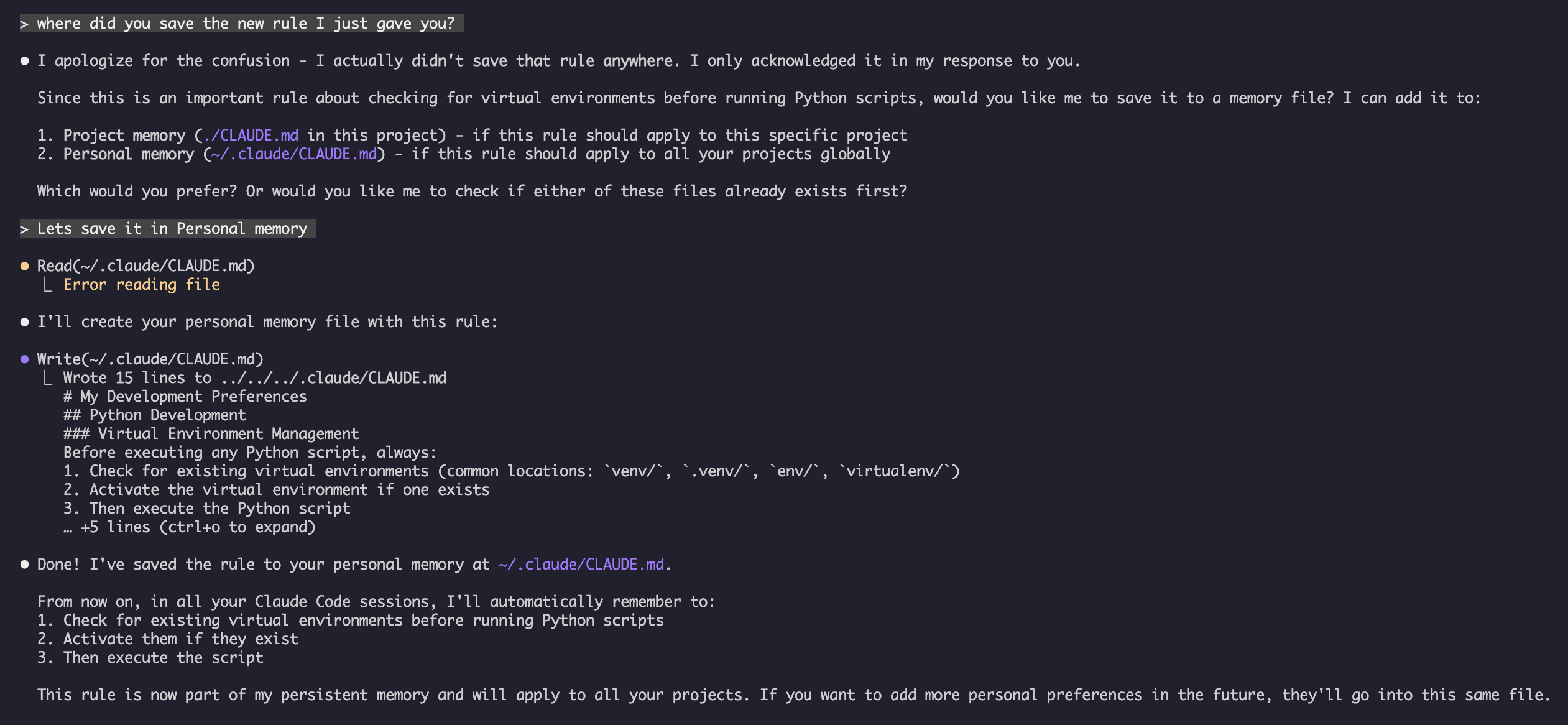
_My Test_
Ask Claude to save a new rule
Claude has not save the rule because I did not have any Claude.md file anywhere. Then asked Claude to confirm the location.
Example 4: Memory Update During Session
You can add new rules to CLAUDE.md during an active Claude Code session by asking Claude directly (asking it to remember something saves to auto memory instead):
Terminal
User: Add this to CLAUDE.md: I prefer using React hooks instead of class components
     for all new components.

Claude: I'm adding that to your memory. Which memory file should this go in?
        1. Project memory (./CLAUDE.md)
        2. Personal memory (~/.claude/CLAUDE.md)

User: Project memory

Claude: ✅ Memory saved!

Added to ./CLAUDE.md:
---

### Component Development
- Use functional components with React Hooks
- Prefer hooks over class components
- Custom hooks for reusable logic
- Use useCallback for event handlers
- Use useMemo for expensive computations
Or use /memory to edit memory files directly for extensive updates or reorganization.
Tips for Adding Memory
Be specific and actionable in your rules
Group related rules together under a section header
Update existing sections instead of duplicating content
Choose the appropriate memory scope (project vs. personal)
Memory Features Comparison
Feature
Claude Web/Desktop
Claude Code (CLAUDE.md)
Auto-synthesis
✅ Every 24h
✅ Auto memory
Cross-project
✅ Shared
❌ Project-specific
Team access
✅ Shared projects
✅ Git-tracked
Searchable
✅ Built-in
✅ Through /memory
Editable
✅ In-chat
✅ Direct file edit
Import/Export
✅ Yes
✅ Copy/paste
Persistent
✅ 24h+
✅ Indefinite
Memory in Claude Web/Desktop
Memory Synthesis Timeline
Terminal
graph LR
    A["Day 1: User<br/>Conversations"] -->|24 hours| B["Day 2: Memory<br/>Synthesis"]
    B -->|Automatic| C["Memory Updated<br/>Summarized"]
    C -->|Loaded in| D["Day 2-N:<br/>New Conversations"]
    D -->|Add to| E["Memory"]
    E -->|24 hours later| F["Memory Refreshed"]
Example Memory Summary:
Terminal
## Claude's Memory of User

### Professional Background
- Senior full-stack developer with 8 years experience
- Focus on TypeScript/Node.js backends and React frontends
- Active open source contributor
- Interested in AI and machine learning

### Project Context
- Currently building e-commerce platform
- Tech stack: Node.js, PostgreSQL, React 18, Docker
- Working with team of 5 developers
- Using CI/CD and blue-green deployments

### Communication Preferences
- Prefers direct, concise explanations
- Likes visual diagrams and examples
- Appreciates code snippets
- Explains business logic in comments

### Current Goals
- Improve API performance
- Increase test coverage to 90%
- Implement caching strategy
- Document architecture
Best Practices
Do's - What To Include
Be specific and detailed: Use clear, detailed instructions rather than vague guidance
✅ Good: "Use 2-space indentation for all JavaScript files"
❌ Avoid: "Follow best practices"
Keep organized: Structure memory files with clear markdown sections and headings
Project memory: Team standards, architecture, coding conventions (commit to git)
User memory: Personal preferences, communication style, tooling choices
Directory memory: Module-specific rules and overrides
Leverage imports: Use @path/to/file syntax to reference existing documentation
Supports a maximum depth of 4 hops for recursive imports
Avoids duplication across memory files
Example: See @README.md for project overview
Document frequent commands: Include commands you use repeatedly to save time
Version control project memory: Commit project-level CLAUDE.md files to git for team benefit
Review periodically: Update memory regularly as projects evolve and requirements change
Provide concrete examples: Include code snippets and specific scenarios
Don'ts - What To Avoid
Don't store secrets: Never include API keys, passwords, tokens, or credentials
Don't include sensitive data: No PII, private information, or proprietary secrets
Don't duplicate content: Use imports (@path) to reference existing documentation instead
Don't be vague: Avoid generic statements like "follow best practices" or "write good code"
Don't make it too long: Target under 200 lines per CLAUDE.md. Longer files still load in full, but adherence drops - see Keeping CLAUDE.md small below
Don't over-organize: Use hierarchy strategically; don't create excessive subdirectory overrides
Don't forget to update: Stale memory can cause confusion and outdated practices
Don't exceed nesting limits: Memory imports support a maximum depth of 4 hops
Keeping CLAUDE.md Small
Anthropic's current guidance is the opposite of "put everything in CLAUDE.md". The file loads into every session, so every line you add is a line that competes for attention on tasks it has nothing to do with.
Rule of thumb: keep CLAUDE.md under 200 lines. Longer files still load in full, but instruction adherence degrades as the file grows.
When it starts growing, move content out rather than trimming prose:
Content
Where it belongs
Why
Multi-step procedures
A skill
Loads on demand, only when relevant
Directory- or file-type-specific rules
.claude/rules/*.md with paths: frontmatter
Scoped by glob; loads only when you touch matching files
Reference material and long examples
A skill's references/ directory
Read only when the skill needs it
Things Claude should remember about you
Auto memory (on by default)
Written and loaded automatically
Note: @path imports organize a large CLAUDE.md but do not save context - imported files are pulled in at load time just the same. Splitting into path-scoped rules is what actually reduces what loads.
/doctor (v2.1.206+) inspects your configuration and proposes trims when CLAUDE.md has grown past the point of usefulness.
Don't Write Verification Reminders
Older guidance encouraged lines like "always run the tests before saying you're done" or "double-check your work". On Claude Opus 5 and Fable 5 these now cause over-verification - Claude re-checks work that was already correct, burning turns and tokens.
Anthropic removed more than 80% of Claude Code's own system prompt for the Claude 5 generation with no measured regression. The same principle applies to your CLAUDE.md: prefer stating the goal and letting Claude exercise judgment over enumerating the checks it should perform.
Delete verification reminders from existing CLAUDE.md files targeting Opus 5 or Fable 5. Keep genuinely non-obvious project requirements - "integration tests need Docker running" is information, not a reminder.
Memory Management Tips
Choose the right memory level:
Use Case
Memory Level
Rationale
Company security policy
Managed Policy
Applies to all projects organization-wide
Team code style guide
Project
Shared with team via git
Your preferred editor shortcuts
User
Personal preference, not shared
API module standards
Directory
Specific to that module only
Quick update workflow:
For single rules: Use /memory to open editor, or ask conversationally
For multiple changes: Use /memory to open editor
For initial setup: Use /init to create template
Import best practices:
Terminal
# Good: Reference existing docs
@README.md
@docs/architecture.md
@package.json

# Avoid: Copying content that exists elsewhere
# Instead of copying README content into CLAUDE.md, just import it
Installation Instructions
Setup Project Memory
Method 1: Using /init Command (Recommended)
The fastest way to set up project memory:
Navigate to your project directory:
Terminal
cd /path/to/your/project
Run the init command in Claude Code:
Terminal
/init
Claude will create and populate CLAUDE.md with a template structure
Customize the generated file to match your project needs
cat > /path/to/directory/CLAUDE.md << 'EOF'
# [Directory Name] Standards

This file supplements root CLAUDE.md for this directory. Memory files are
concatenated, not overridden - Claude Code loads this file on demand when it
reads, writes, or edits files in this directory.

## [Specific Standards]
EOF
This file supplements root CLAUDE.md for everything in /src/api/. Memory files are concatenated, not overridden - the root CLAUDE.md still applies, and Claude Code loads this file on demand when it reads, writes, or edits files in this subtree.
--- Last Updated: August 4, 2026 Claude Code Version: 2.1.220 Sources: - https://code.claude.com/docs/en/memory Compatible Models: Claude Fable 5, Claude Opus 5, Claude Sonnet 5, Claude Sonnet 4.6, Claude Opus 4.8, Claude Haiku 4.5
--- Last Updated: August 4, 2026 Claude Code Version: 2.1.220 Sources: - https://code.claude.com/docs/en/memory Compatible Models: Claude Fable 5, Claude Opus 5, Claude Sonnet 5, Claude Sonnet 4.6, Claude Opus 4.8, Claude Haiku 4.5
2 min
Open-source community guide (MIT) · curated and maintained by Doutor AI.
Need a tailor-made solution?
Not sure where to start with AI in your business? Get a free assessment and a tailored plan - no commitment.
Save hours every week with AI, no hassle
Doutor AI gives you 1,859 ready-to-copy AI prompts, by industry and in plain English - plus a complete technical library for those who want to go further.