

Generative InterfacesAdvanced
AI Dashboard Canvas Agent
An agent that populates live charts, metrics, and real-time data into a Canvas dashboard instead of just streaming text. Built with CopilotKit, AG-UI,…
- OpenAI
- Gemini
Generative Interfaces ·Advanced
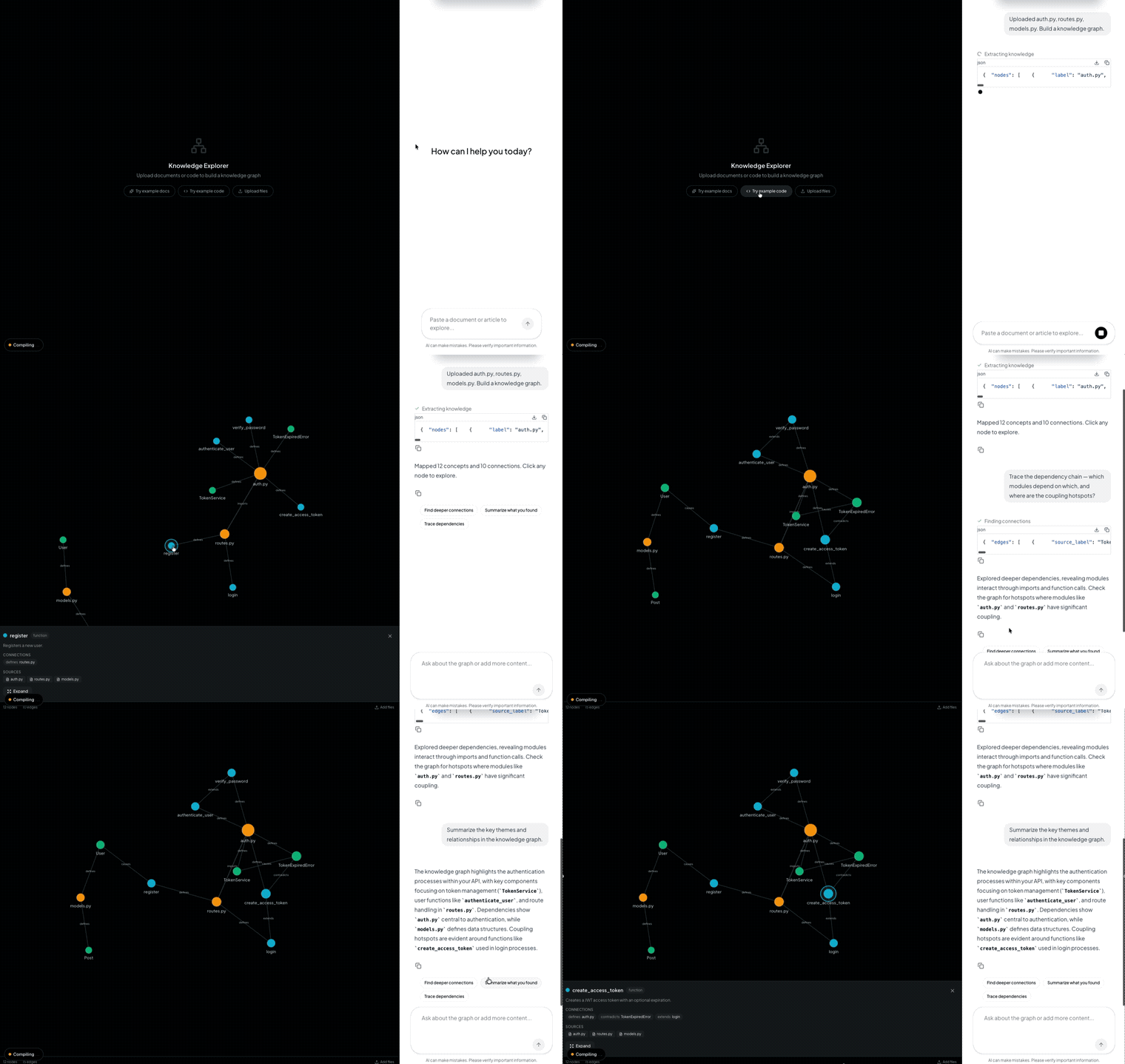
Drop files - documents or source code - into a chatbot. The agent extracts entities, concepts, and relationships (or modules, classes, functions, and dependencies), then renders an interactive knowledge graph you can explore.
OPENAI_API_KEYSECRET_KEYLicense Apache-2.0 · content curated and maintained by Doutor AI.
Drop files - documents or source code - into a chatbot. The agent extracts entities, concepts, and relationships (or modules, classes, functions, and dependencies), then renders an interactive knowledge graph you can explore.
Click a node to see details. Double-click to expand it - the agent extracts sub-concepts (or sub-components for code) and adds them to the graph. Ask questions in chat to navigate.
.txt, .md, .json, .csv) or code files (.py, .ts, .js, .java, .go, .rs, and more) onto the canvas| Layer | Technology |
|---|---|
| Frontend | Next.js 16, React 19, TailwindCSS 4 |
| Agent | LangGraph (Python), CopilotKit Middleware |
| Graph | react-force-graph-2d |
| LLM | OpenAI (configurable via env) |
| Protocol | AG-UI (state streaming) |
On the default model (gpt-4o): extraction (extract_knowledge, find_connections, expand_node) works by prompting the model to return raw JSON and parsing it - there's no function-calling schema or structured-output mode tuned specifically to gpt-4o, so any model with solid instruction-following should work as a drop-in swap via OPENAI_MODEL. gpt-4o was picked as a well-understood, inexpensive baseline for reliably following the "return only JSON" instruction, not because it was benchmarked against newer models for this task. If you swap in a newer or reasoning-focused model, expect it to work, but re-verify the "ONLY valid JSON" instruction is still being honored (some models wrap output in explanation or markdown even when told not to).
npm install runs uv sync automatically. Install it with curl -LsSf https://astral.sh/uv/install.sh | sh (macOS/Linux) or powershell -c "irm https://astral.sh/uv/install.ps1 | iex" (Windows). uv fetches Python 3.12 for you if it isn't already installed.# 1. Install dependencies (also runs `uv sync` for the Python agent)
npm install
# 2. Set your API key
cp .env.example .env
# Edit .env and add your OPENAI_API_KEY
# 3. Start the app
npm run devThis starts both the Next.js frontend (port 3000) and the LangGraph agent (port 8125). On Windows the same npm scripts run the .bat equivalents under scripts/.
Two built-in example sets let you try both modes - click the buttons on the empty state to load them instantly.
Documents - 3 markdown files about AI agents:
what-are-agents.md - defines agents, core components (LLM, tools, memory, planning)agent-frameworks.md - compares LangGraph, CrewAI, AutoGen, CopilotKitagent-challenges.md - hallucination, tool reliability, evaluation, cost, securityExpected graph: ~15-22 nodes, ~20-33 edges covering the AI agent ecosystem.
Codebase - 3 Python files forming a FastAPI auth system:
auth.py - JWT token creation, password hashing, TokenService classroutes.py - login, register, refresh endpoints, dependency injectionmodels.py - SQLAlchemy User, Post, AuditLog modelsExpected graph: ~20 nodes showing modules, classes, functions, and their imports/calls/extends relationships.
| Tool | Purpose |
|---|---|
extract_knowledge | Parse documents or code, extract entities/concepts/relationships or modules/classes/functions |
find_connections | Discover deeper links between existing nodes |
expand_node | Deep-dive into a node - adds sub-concepts and detail |
ai-knowledge-explorer/
├── agent/                    # Python LangGraph agent
│   ├── main.py               # Agent entry point
│   └── src/
│       ├── state.py           # KnowledgeState schema
│       └── tools.py           # extract, connect, expand tools
├── src/                       # Next.js frontend
│   ├── app/
│   │   ├── page.tsx           # Main page (chat + graph canvas)
│   │   ├── layout.tsx         # CopilotKit v2 provider
│   │   └── api/
│   │       ├── copilotkit/    # CopilotKit runtime route
│   │       └── upload/        # File upload endpoint
│   ├── components/
│   │   ├── KnowledgeGraph.tsx  # Force-directed graph visualization
│   │   ├── NodeDetail.tsx      # Detail panel on node select
│   │   └── ToolReasoning.tsx   # Tool call status indicators
│   ├── hooks/
│   │   ├── use-knowledge-ui.tsx
│   │   └── use-suggestions.tsx
│   └── lib/
│       ├── types.ts            # KnowledgeNode, KnowledgeEdge types
│       └── example-content.ts  # Built-in example documents and code
├── package.json
└── .env.exampleAn agent that populates live charts, metrics, and real-time data into a Canvas dashboard instead of just streaming text. Built with CopilotKit, AG-UI,…
A deep research assistant that plans, searches the web, writes to a virtual filesystem, and renders each tool call as a live card in a workspace pane.…
A multi-agent financial coach that analyzes your budget, plans your savings, and builds debt-payoff strategies - rendered as interactive UI cards in a…
Need a tailor-made solution?
Not sure where to start with AI in your business? Get a free assessment and a tailored plan - no commitment.
Doutor AI gives you 1,859 ready-to-copy AI prompts, by industry and in plain English - plus a complete technical library for those who want to go further.